Creating custom tags

Olivia -
If there was a way to create project tags that we could then pull reports from, that would be great. For example, we have noticed that we have several projects that we onboard and then they fall through for various reasons before we start working on them. We would like to be able to add a tag (like the color coding option) that could say "dropped" or something like that and then we could pull a report of all projects that have that tag so then we could show upper management how many projects fall through in which areas based on outside factors.
We would like this feature as well. Its a great way to add an additional level of filtering/reporting based on commonalities between projects/folders/tasks. I know TeamWork has this feature and I liked it when I used that product.
Custom tags so we can designate the team the project belongs to.
Wrike needs tags and colors for cards and for assignees. This is base-level Toyota Production System/Kanban basics, and would be a major improvement to the agility or flexibiltiy of visual task managment. Please get this put into practice.
Hey everyone, thank you for all of the feedback! It's all been passed on to our Product team.
REALLY GOOD NEWS ON TAGs!!
I'll stop yelling. I'm just so happy.
Do this:
Create a folder called Tags
Create a folder inside this folder for each tag you want, name it anything you like, and select a color for that tag-folder.
Add these "tags" (that are actually folders) to any task you want. They show up on the face of each task card on Board view. You can even add multiple "tags." This is seriously liberating. A major victory for TPS and Kanban style visual management.
All props go to @derekblackham my Wrike Deployment asset. And what an asset he has been!
Thanks a lot for sharing, Michael Combest, really helpful! :)
Lisa Community Team at Wrike Wrike Product Manager Conviértete en un experto en Wrike con Wrike Discover
Lisa Wrike Team member Conviértete en un experto en Wrike con Wrike Discover
Thanks @Michael Combest for a work around. I'd love to see the ability to run a report based on a certain tag as a native feature in Wrike. Seems like we work to hard to make the system work for us.
Another workaround for this is to create a custom field. Navigate to the space, on the top right next to the settings widget, click the ... 3 dot menu and go to "manage custom fields." Add a new field and label it "Tags" and then set it as "Single Select" from there you can create a drop down list of tag options that will show up under the fields tab above the bio/description box under any task. You can then pull a report and select Tags under the settings tab. You will be able to filter by Tag in the report.
Thank you for sharing your tip Sara Wahlund!
Appreciate the effort given to solving the tag solution. But Wrike really needs to get this solved properly. This seems like basic functionality for these types of products, esp. in '23!
Hi Bartt Kuhlmann, welcome to the forums 👋
It would be great if you could share your specific use case so we can look into it together. Tags do exist in Wrike and can be color-coded and the solutions provided above by members work for the majority of the use cases.
Lisa Community Team at Wrike Wrike Product Manager Conviértete en un experto en Wrike con Wrike Discover
Lisa Wrike Team member Conviértete en un experto en Wrike con Wrike Discover
The documentation on help.wrike.com that talks about tagging of folders seem out of date. What I see in my instance of Wrike is not the same as what the doc shows. I am in in a List view and after opening the 'info' screen/popup there is no apparent capability to add tags.
Bartt Kuhlmann Is this how it looks in your account? If so, you should be able to add pre-created tags in the location field:
Lisa Community Team at Wrike Wrike Product Manager Conviértete en un experto en Wrike con Wrike Discover
Lisa Wrike Team member Conviértete en un experto en Wrike con Wrike Discover
The location "tagging" works, but is cumbersome since you have to dig through all of the projects/folders in a space(or account) to find the tag you want to add. Plus is makes it harder for users to add new tags and has no built in ability to filter duplicates. It would be nice to have a tagging system outside of the location system, something like you would find in a DAM. The advantage to that would be clarity on what is a tag vs a project/folder, and what tags are in the system already. For instance, we have a custom item type used for image assets. If someone adds one that is an image of a dog in a flower patch, and they want to tag it with "dog" and "flowers", with the location they need to search for dog or flowers to see if there is a "tag" folder. If there is not, they would need to go to the "tags" main folder and add a new folder for the tag, then go back to their asset to add it to the "tag" folder. With a real tag system, if the users typed in the tag field, it would show them a list of existing tags for them to select, similar to the location, but if it doesn't exist, they just enter the new tag into the tag field and it is added to the system for future use. Here are some images of the tag system from the DAM we use.
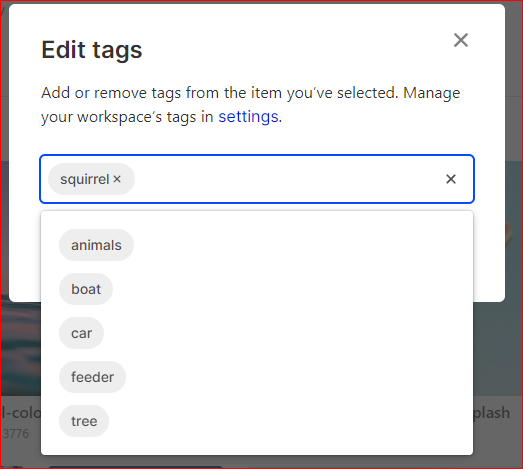
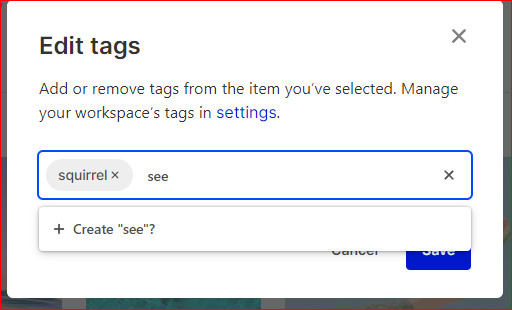
Hi Russell Sprague, thank you for your valuable and detailed feedback! We acknowledge the points you've raised about usability and shared your suggestions with our Product Team. We'll keep you informed in case there are any changes regarding this feature 👍
Hi, @...! Any updates here! Running into similar problems as @Russell Sprague. Thanks so much!
Hi Gabriella Freeman, welcome to the forums 👋
No updates apart from the tagging feature that already exists in Wrike - you can create tags and color-code them already. Could you please let me know if you're using them? We understand that the tags don't work exactly like Russel shared above, and we've passed that feedback to our team, but other than not being able to create a new tag right there when searching for a tag, this functionality works really well. Please let me know your thoughts.
Lisa Community Team at Wrike Wrike Product Manager Conviértete en un experto en Wrike con Wrike Discover
Lisa Wrike Team member Conviértete en un experto en Wrike con Wrike Discover
Hello, please excuse me if this post is old.
I don't get how you can set tags/labels (with colors eventually) to tasks.
what I am looking for is exactly what Trello does, I show here some screenshots, it is just simple as shown here:
Hi Baruch Manigrasso, apologies for the late reply!
It's possible to create custom tags as custom fields in Wrike, and you can color-code single-select and multi-select types of custom fields:
Let me know if you'd like to dive deeper into the topic!
Lisa Community Team at Wrike Wrike Product Manager Conviértete en un experto en Wrike con Wrike Discover
Lisa Wrike Team member Conviértete en un experto en Wrike con Wrike Discover
The current "tags" built into Wrike are not tags, they're preexisting locations. It would really be helpful if tags could be added as a free-form field that doesn't require the tags to be created beforehand or be managed like a custom field. I'd like for anyone to be able to enter whatever tag they want on a folder, project, or task and then be able to filter on those tags. We're using a custom field as a workaround, but it is tedious as someone has to manage the available options.
Rohan V Community Team at Wrike Wrike Product Manager Conviértete en un experto de Wrike con Wrike Discover
Rohan V Wrike Team member Conviértete en un experto de Wrike con Wrike Discover