No notification settings on Wrike for Mac

I am using Wrike On Mac (ARM) and Wrike does not appear in my system setting for notifications and therefor I have no notification settings and no notifications.
Steps I have taken:
- Uninstalled Wrike
- Downloaded new install file
- Installed new file
-
I've seen post dating back to 2018 on this but have not seen a solution.
Welcome to the Wrike Community, Phillip Pennington. I can see that you are in touch with our Support team, who will be able to help you with this. Please let us know if there's anything else we can assist you with. 😊
Basudha Sakshyarika Community Team at Wrike Wrike Product Manager Conviértete en un experto de Wrike con Wrike Discover
Basudha Sakshyarika Wrike Team member Conviértete en un experto de Wrike con Wrike Discover
I haven't thought of this - definitely upvoting as a Mac user of the desktop app!
Is there already a fix, Basudha Sakshyarika?
Hey Anna Giacobbe! Here’s what our Support team has suggested:
To ensure that you receive popup notifications from the Wrike desktop application on your Mac, open your Mac’s notification settings and make sure that all three toggles under “Show previews” are enabled. Next, scroll through the list of apps, find the Wrike app, click on it, and ensure that all notification options are turned on. It is also recommended to check your Focus settings to confirm that the current mode allows popups and notifications, and isn’t set to “Do Not Disturb.”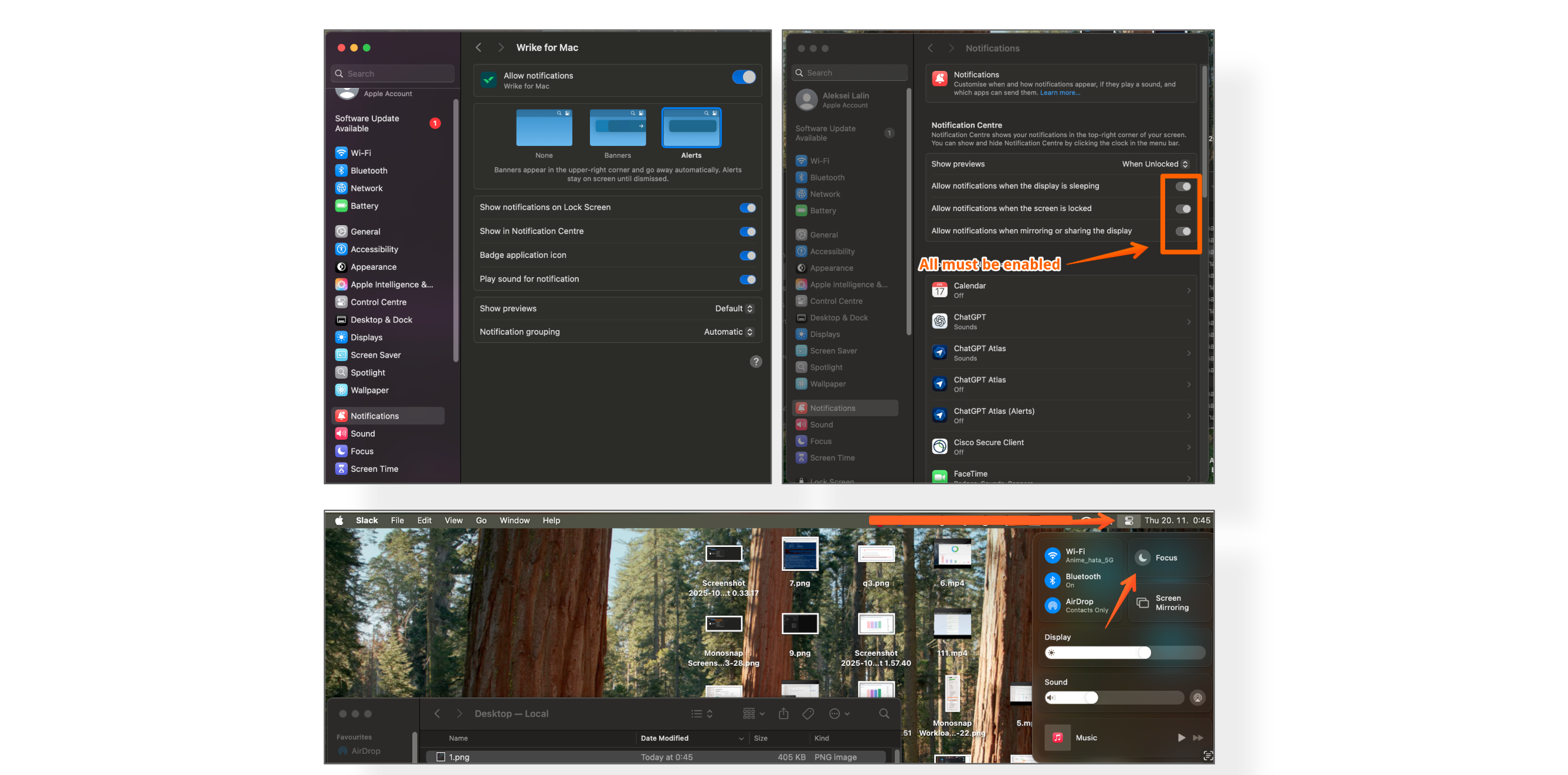 Hope this helps!
Basudha Sakshyarika Community Team at Wrike Wrike Product Manager Conviértete en un experto de Wrike con Wrike Discover
Basudha Sakshyarika Wrike Team member Conviértete en un experto de Wrike con Wrike Discover
Basudha Sakshyarika this is very helpful, thanks :D confirming it works!
Basudha Sakshyarika you're not understanding the issue. The problem isn't understanding how to enable notifications, the problem lies within the Wrike Install file. Wrike does not even show up as an application in system settings despite being an app in the root applications folder. In this scenario there are no notification settings.
I was able to break through buy downloading an attachment in a task...after several months magically notifications become available, but this clearly a bug, not a solution. It effects every Mac user on my team.
Thanks for explaining this, Phillip Pennington. I have shared your feedback with our team responsible for the Desktop App. We’ll keep you updated! 😊👍🏽
Basudha Sakshyarika Community Team at Wrike Wrike Product Manager Conviértete en un experto de Wrike con Wrike Discover
Basudha Sakshyarika Wrike Team member Conviértete en un experto de Wrike con Wrike Discover