How to highlight weekends with grey (gray) shading on Gantt Chart view

How do you set weekends to show with grey lines on Gantt Chart view?
Would ideally be universally viewed this way for all users.
Am aware this is an admin-level setting, but googling for a simple how-to on achieving this came up empty.
Thanks.
Hi Angela Kennewell, welcome to the Community! 🙂
Account admins can set up the workweek in the "Work Schedules" tab. Once you set Saturdays and Sundays as non-working days and save the changes, these days should be greyed-out on the Gantt Chart 👍
Hope this helps!
Lisa Community Team at Wrike Wrike Product Manager Werde ein Wrike-Experte mit Wrike Discover
Lisa Wrike Team member Werde ein Wrike-Experte mit Wrike Discover
Lisa Stumbled across this post to check how we can incorporate the regional holidays or publich holidays in the gantt timeline. Does setting the workschedules with certain holidays marked can result in the gantt chart to show greyed out columns for the holidays set?
Yes Piyush Menon, you have to set up here holidays
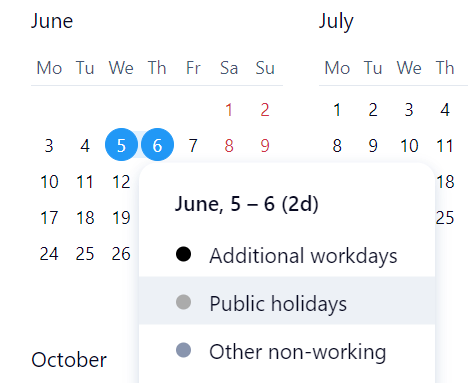
Thanks Pietro Poli!
Hi @... Pietro Poli. I think my message was not clear , what i want to see is if set my work schedule to include some regional holidays on specific dates. Can it result to show the Project gantt chart with greyed out option as you see for weekends.
For example , lets say May 24 and May 27th is set as other non-working day / holiday in the workschedule. But it currently does not show the those dates greyed out in Gantt timeline of my projects.
Piyush Menon Hi! It can be set up by admins for account work schedules, but not on individual work schedules. I hope this helps!
Lisa Community Team at Wrike Wrike Product Manager Werde ein Wrike-Experte mit Wrike Discover
Lisa Wrike Team member Werde ein Wrike-Experte mit Wrike Discover