Timelog Glitch: Unsubmitted Entries Disappear While Editing

This year, I have been experiencing a glitch that erases unsubmitted timelog entries that occurs when I edit time on a paused entry from the dropdown menu while another is running in the background (i.e., if I edit time on a task without pressing the play button first). In order to avoid this, I have to press play on every task before editing the time. If I do not, the entry often disappears, erasing all time associated with it.
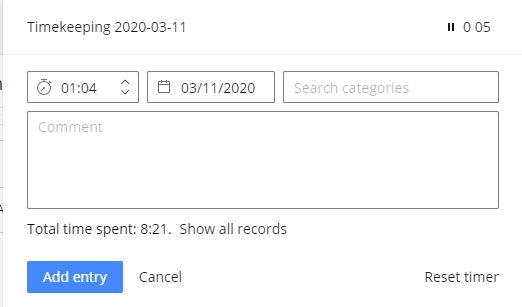
I have attached an example of this occurring. In the example, I had a task ("Timekeeping") running in the background while I submitted entries for the day. When I clicked into the task dropdown menu to edit time on another task (the one with 01:04 logged), the title for the task I was editing disappeared and was replaced with the Timekeeping task (shownhere with 5 minutes of time running).
Afterward, all time logged on the task with 01:04 was erased and the task disappeared from the dropdown menu. I had to revisit the original task and create a new entry.
Hi Andrew Castaneda! I can see that you've also raised a ticket with our Support about this - please get back to the agent there when you can if you're still experiencing this!
Lisa Community Team at Wrike Wrike Product Manager Werde ein Wrike-Experte mit Wrike Discover
Lisa Wrike Team member Werde ein Wrike-Experte mit Wrike Discover