Include Project Name in Folders

When using folders within a project, as a way to create groups or phases of a single project, I'm running into an issue. The task menu only tells me what folder the task belongs to, but not the project. For example, let's say I have a project named "Project Example," and I create two folders within this project named, "Folder Example A" and "Folder Example B." When adding tasks to "Folder Example A" the task menu only tells me that it belongs to "Folder Example A" not to the overall "Project Example."
This makes it difficult to try to organize projects into phases, because the task does not tell my team what project it belongs to, only what folder. I've included an image below to illustrate what I mean.
Wrike has suggested that I use a naming convention for folder names to include the project name or project abbreviation. This workaround will not solve the issue. It means that each folder within a project needs the name of the client, project, and phase name. This naming convention is too long to be effective and creates frustration for the reader.
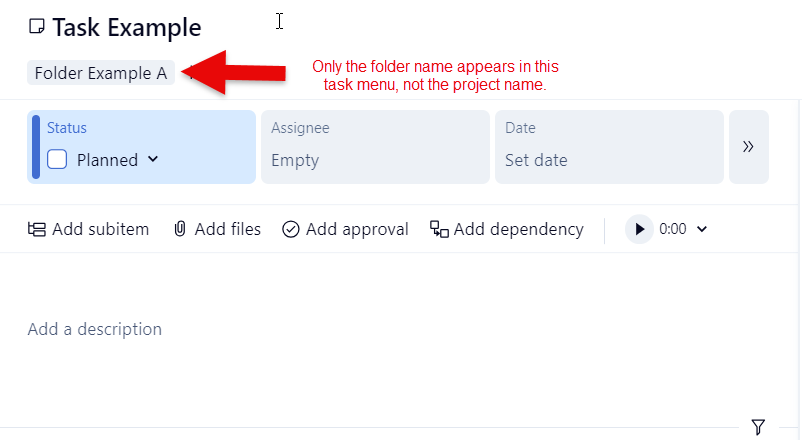
A task menu should always tell me what project the task belongs to, regardless of whether it lives in a folder within the project. Knowing the project for the task is the most important part of task management.
Agree! Some of our project titles are quite intricate, and having to copy this down manually to all folders and tasks is cumbersome, and also makes it difficult to quickly see what a task/folder actually is.
Hi Audrey Hornick-Becker, Thanks for taking time to share your detailed feedback and example. I've passed it along to the relevant team 👍
Rohan V Community Team at Wrike Wrike Product Manager Werden Sie ein Wrike-Experte mit Wrike Discover
Rohan V Wrike Team member Werden Sie ein Wrike-Experte mit Wrike Discover
This problem is also inherent in timesheets. The Location only shows the Folder, not the project. We have multiple projects created using a blueprint, all with the same folder structure and same task names. It makes it virtually impossible to use timesheets. the only workaround Wrike suggest is manually tag each task with the project. Manually tagging 1000s of tasks is not feasible.
Rohan V Community Team at Wrike Wrike Product Manager Werden Sie ein Wrike-Experte mit Wrike Discover
Rohan V Wrike Team member Werden Sie ein Wrike-Experte mit Wrike Discover