[Bug] TimeSpent is missing in custom item type (project)

Hello,
a very important information goes missing when we convert a project into a custom item.
A normal project has the attribute "Time Spent" that aggegrate all time entries from tasks and subtasks. When we change the item type then this attribute is gone. So we don't have the opportunity to check how much effort has already been invested in this project.
PoC:
1. Time Spent is available in a normal project

2.Item Type is changed

3. Time Spent is not visible

Thank you for reaching out, Marco Eberl (73271133) and reporting this! I've asked my colleagues from the Support team to investigate this 👍 They will be keeping you posted.
Lisa Community Team at Wrike Wrike Product Manager Werde ein Wrike-Experte mit Wrike Discover
Lisa Wrike Team member Werde ein Wrike-Experte mit Wrike Discover
I'm wondering if there has been progress on adding the Time Spent field back into custom project types. This is an issue for us, as well.
Thank you for letting us know Cassie DeLozier Miller! I don't have an update for this one currently, but we keep it on our radar and we'll announce any updates in the future if we have them.
Lisa Community Team at Wrike Wrike Product Manager Werde ein Wrike-Experte mit Wrike Discover
Lisa Wrike Team member Werde ein Wrike-Experte mit Wrike Discover
Hi Wrike Team,
This bug is over 2 years old. Is there a way to escalate this issue for a fix?
This is causing issues for our team and onboarding.
Thank you
Hi Opal Levis 🙋🏻♀️ Welcome to Wrike Community!
This request seems to have been taken care of, so that's odd. 🤔 I am looping in our support team to help here. You can expect them to reach out soon. Thank you!
Basudha Sakshyarika Community Team at Wrike Wrike Product Manager Werden Sie ein Wrike-Experte mit Wrike Discover
Basudha Sakshyarika Wrike Team member Werden Sie ein Wrike-Experte mit Wrike Discover
Hi Basudha,
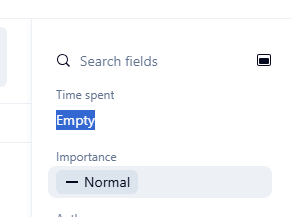
On custom items we can't enter anything into the "Time spent: field. It is locked/uneditable.
Hi Opal Levis, chiming in for Basudha here. I can see that our support team has reached out to you, and I hope they were able to assist you. Do let us know if you have any other questions. Thanks!
Rohan V Community Team at Wrike Wrike Product Manager Werden Sie ein Wrike-Experte mit Wrike Discover
Rohan V Wrike Team member Werden Sie ein Wrike-Experte mit Wrike Discover