Show full shortcut (don't truncate) for Expand/Collapse subitems

In views, for the "Subitems" menu, the "Collapse all" and "Expand all" options display a shortcut, but it is truncated, regardless of browser zoom level:
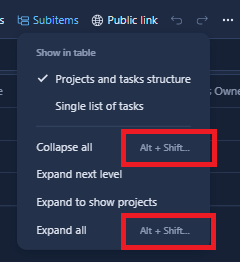
Only by using the browser inspector can I see what the full shortcut is: 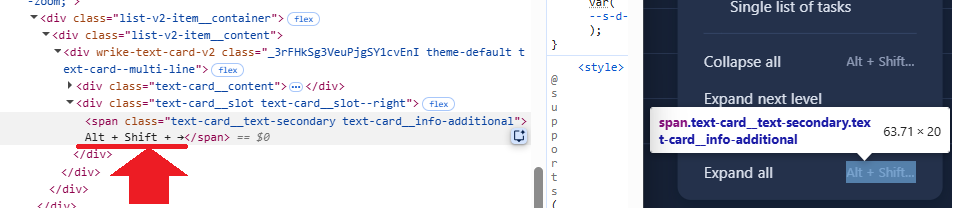
I'm running Windows 11 Enterprise, and experiencing this on all 3 of my browsers: Chrome, Firefox, Edge.
Thanks for bringing this up, Sergey Lyakh. Could you please let me know which operating system and browser you are using? That would be helpful. Thanks!
Basudha Sakshyarika Community Team at Wrike Wrike Product Manager Станьте экспертом в Wrike с Wrike Discover
Basudha Sakshyarika Wrike Team member Станьте экспертом в Wrike с Wrike Discover
Basudha Sakshyarika, I'm running Windows 11 Enterprise, and experiencing this on all 3 of my browsers: Chrome, Firefox, & Edge.
Thank you for sharing the details, Sergey Lyakh. I will pass this on to the responsible team and keep you in the loop regarding any updates. 👍🏽
Basudha Sakshyarika Community Team at Wrike Wrike Product Manager Станьте экспертом в Wrike с Wrike Discover
Basudha Sakshyarika Wrike Team member Станьте экспертом в Wrike с Wrike Discover