Dashboards - Basic Formatting Control

I would love the ability to have a little more control over the visual display of widgets in new dashboards. Ex: conditional formatting for a simple Indicator to turn red if over/under a certain number. We use dashboards to monitor overall portfolio health and performance, and it would be easier for my leadership team to focus on the areas that are outside expectations with visual cues.
Basudha Sakshyarika Community Team at Wrike Wrike Product Manager Torne-se um especialista em Wrike com o Wrike Discover
Basudha Sakshyarika Wrike Team member Torne-se um especialista em Wrike com o Wrike Discover
Whitney Norton I totally get what you are saying. We had a similar setup at a previous company where we used QuickBase.
The indicator that is showing is nice, but it doesn't stand out as much as being able to change the color of the whole row.
In the past, I used that not only to make rows with certain dates in a certain range stand out, but we also did it for special priority tasks. This way, when it hit an employee's dashboard, it would jump out at them.
That makes sense. Thanks for providing more details, Tiffany! I'll make sure to share your feedback with our product team. 👍🏽
Basudha Sakshyarika Community Team at Wrike Wrike Product Manager Torne-se um especialista em Wrike com o Wrike Discover
Basudha Sakshyarika Wrike Team member Torne-se um especialista em Wrike com o Wrike Discover
Thanks Tiffany and Basudha Sakshyarika! This is super quick and dirty but I'd love something even as simple as being able to control the font and background color of the widgets themselves. Sometimes I have a metric that is always a "bad guy" in this case how much of a project's overall budget is currently in dispute - I want those to be red. I might want my pending but fine metrics to be blue, and the others green.
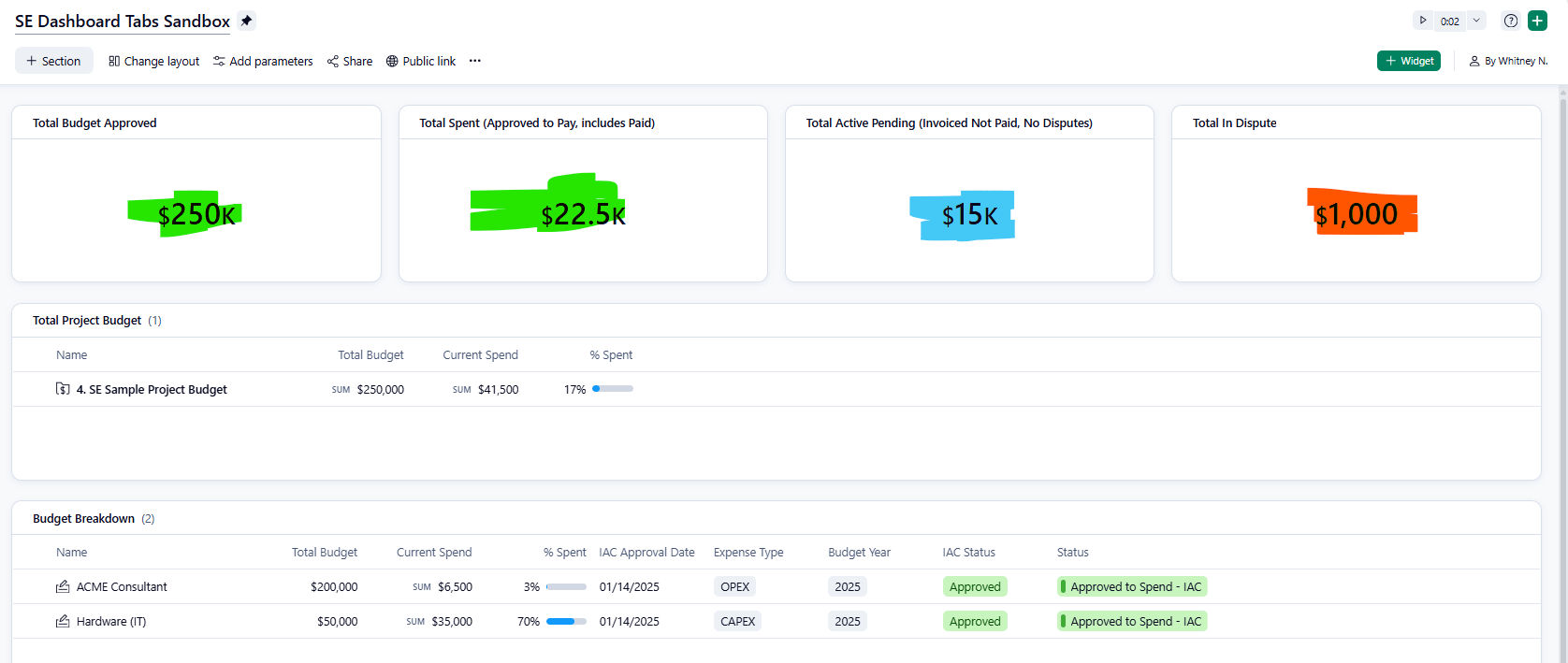
Lots of other use cases for us as well - basically the ability to leverage some basic visual cues to help folks interpret the data quickly. Conditional abilities would be amazing (make red if total is less than X) but even just a manual selection of font color and background color would be stellar.
Hi Whitney Norton, I hope you don’t mind me chiming in for Basudha here. Thanks for providing further explanation along with sharing the mockup screenshot. This makes sense, and your feedback has been sent over to the responsible team now. If there are any developments in this aspect, I’ll be sure to let you know 🙂
Rohan V Community Team at Wrike Wrike Product Manager Torne-se um especialista em Wrike com o Wrike Discover
Rohan V Wrike Team member Torne-se um especialista em Wrike com o Wrike Discover
Thanks Rohan V!