My to-do view showing projects associated with assigned tasks

In the view of the tasks show in 'My to-do', it would be helpful to see the Project associated with the tasks assigned to me. Often, we will have repetitive tasks for the type of work we offer. Seeing the project (we have our client name in the title too), would help us work more efficiently.
Hey Amanda Gregory, welcome to the Community 👋
In My to-do, the project or folder tags are visible for tasks, does this help?
Lisa Community Team at Wrike Wrike Product Manager Torne-se um especialista em Wrike com o Wrike Discover
Lisa Wrike Team member Torne-se um especialista em Wrike com o Wrike Discover
Lisa In my experience, we can only see the highest-level folder/project, which is a barrier when you have multiple projects in a folder or sub-projects. This is troublesome for standard tasks that are assigned for each project. We end up with 20 tasks with the same title in the same folder, so they are difficult to discern from my-to-do.
We have made a work around by adding project prefixes to all of the tasks, but project titles can be lengthy and can clutter the field as well.
Lynn is absolutely correct. We have just that. It is so confusing to follow unless you open every task or hover over the task on your list.
Hi Lynn Graham, thank you for the additional details, I've passed your comments to our Product Team 👍
Amanda Gregory welcome to the Community! Thank you for supporting this suggestion 🙂 Allow me to mention that you can check our New to Community forum to discover all the resources you can find in our Community.
If you have any additional questions, please let us know.
I'm also wondering about this. I'm working on about 40 projects and have tasks in progress on almost all of them. When i look at "My To-do" I can't see which project the list of tasks are under. It really makes the "My To-do" unusable for me
I'm sorry to hear you're having this experience Eric Seagren, I assume the tasks aren't tagged with the relevant projects and this results in some missing project names in My-to do. Is this correct?
I'm afraid that it will be necessary to add the items to the relevant projects for them to be displayed next to the name of the task in my to-do.
Thanks @..., the issue is my tasks need to be organized in sub-folders. The "My to-do" feature will show the task and the folder it's in but not the overall project. Also, every project has almost identical tasks so it's impossible to know which projects a task is for. Further, when I click on a task on the "My to-do" list, the task info pane doesn't show which project, only the folder that the task is located in shows directly beneath the task title.
Hi Eric Seagren, thank you for your reply and for the additional details, I've passed your feedback on to our Product Team 👍
If there's anything else we can help you with, please don't hesitate.
HI Juan, is this on the roadmap at all with product? It would be extremely helpful to see everything assigned to a user in one place, quickly, in Wrike. We are finding that not having this is a barrier to adoption by our team.
Hello Christin Engstrom, welcome to the Community, and thank you for sharing your use case with us. I'm sorry to hear this is causing issues for you and your team. May I ask if you have tried New Dashboards? You can create a widget to see all the items assigned to you or any user and enable the "Location" column to easily see where the items are located.
Could this be an option for you?
Hi Juan,
The Location field is not useful for the same reasons listed above - it shows only the folder the task is in (usually a subfolder, not the top-level project). I agree with everyone above, in that we also have projects that are almost all the same (they are created from a Blueprint), with many levels of subtasks, so seeing the folder a task is in is rather useless. People assigned to a task need to know what project it's in. I've searched high and low for a solution, tried workarounds, but couldn't find one (Automations don't have a way to copy the project name into a custom field, for example). This is really causing quite a headache for our teams, and I see it's been requested more than once, in different community forums. Can the votes all be compiled so that this can be added in Wrike?
Hi Karen Sudre, thank you for sharing your feedback with us. I'm sorry to hear you didn't find this option useful. We pass all your comments on to our Product Team, and the most popular ideas have more chances to be added. However, not all suggestions can be prioritized as fast as we'd like, or implemented.
In case you'd like to learn more about how we process feedback, please feel free to check this article 🙂
Please, rest assured that our relevant team is aware of the popularity of this suggestion and that we will keep you updated if there are any changes 👍
Another vote from our team for adding greater depth of information to the my to-do folder.
Our team finds great value in this feature as it allows them to triage their work for the day or week. However, the fact any project item types they are assigned to do not appear in the my to-do folder really limits the functionality. This has always struck us as a curious thing, because projects have deadlines and assignees just as much as tasks do. All the more so since Wrike has allowed for custom project types.
The new dashboards really help and we have utilized them to work the problem. But the prominence of my to-do means that's where people turn first. Is there anything on the roadmap to introduce project item types into my to-do, or is Wrike moving away from my to-do and focusing on dashboards?
Love the new dashboard features, it's really improved life at our shop. Thanks!
Hi!
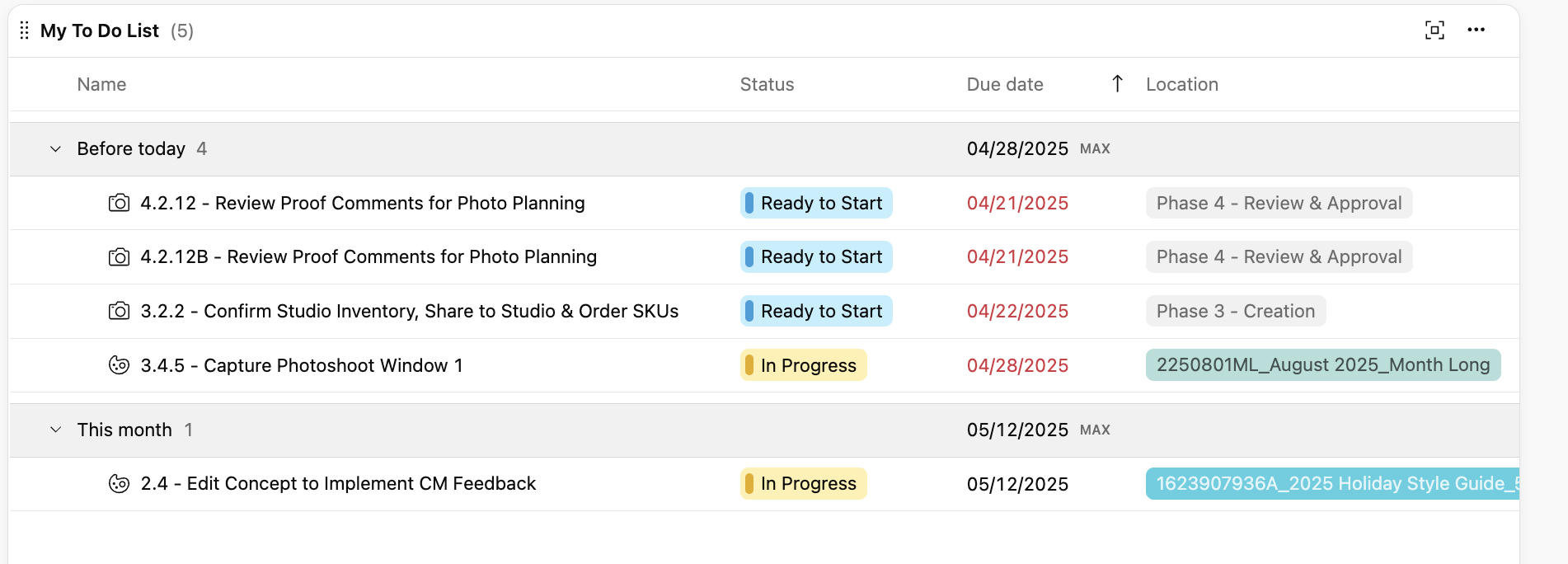
My team also organizes our projects in subfolders (we have 6 creative phases per project and have specific tasks within each phase) but the project name won't show up consistently in our dashboards and to-do lists. Some tasks will show the project name and others will just show the name of the phase folder. I don't understand how this inconsistency exists.
Can the Product team please work on implementing a solution that shows the hierarchy of a task's Location? This hinders our teams ability to prioritize work in their to-do lists and dashboards.
Hello 🙋♂️ Apologies for the delayed response!
Charles Wiff thank you for sharing your feedback with us. We're also glad to hear that the New Dashboards' features have been beneficial for your work!
Sally Kershner, thanks for commenting and sharing your feedback as well. Currently in Wrike, a task will display the name of its direct parent location (which could be a folder or project) in dashboards and to-do lists. If your tasks are inside subfolders (e.g- creative phases), the system shows the subfolder name, not the top-level project name. I understand this may not be ideal for your use case, so I am sharing your comment with the relevant team for their visibility.
In the meantime, if you’d like to check if there are any workarounds, please feel free to contact our Support Team. Alternatively, let me know and I can have one of our experts reach out to you.
If there are any developments regarding this suggestion, we’ll be sure to post an update here 👍
Rohan V Community Team at Wrike Wrike Product Manager Torne-se um especialista em Wrike com o Wrike Discover
Rohan V Wrike Team member Torne-se um especialista em Wrike com o Wrike Discover
I want to see my Rocks in my to do list. How do I do that? I tried in the filters and even selected my department but my Rock did not show up in my to do.
Hi! I am also very interested in this feature. We have a dedicated space for projects and organize our tasks within subfolders. All of our sub-folders and tasks are the same for each project, so without the ability to sort the to dos by the top project folder makes it very difficult to navigate.
Are there any solutions in the works?
Thank you,
Becca
Hi!
Another vote from our team for adding greater depth of information to the my to-do folder.
We recently onboarded our team to Wrike and they are running into the same frustration others have mentioned in this thread. We use blueprints, which results in users’ To Do lists being difficult to navigate and makes it hard to quickly identify which project each task belongs to.
Our users often work across multiple projects, and having only the “location” field to rely on isn’t enough. I can manually add the project name to each task, but with over 80 tasks in our blueprint and each user managing several projects, this process isn’t sustainable.
Adding a way for the project name to automatically display with each task would make a big difference for our team. Another vote from us for the development team to prioritize this improvement.
To me, not knowing which project a task belongs to is a major limitation of the platform. My to-do list is virtually unusable—especially on mobile.
Hi! Our team faced the same issue where we are in multiple projects, and the tasks are under sub folders/item types. The tasks are the same for each project. There is no way for the team to view all projects they are working on.
Upvote for the development team to prioritize this feature.
Rohan V Community Team at Wrike Wrike Product Manager Torne-se um especialista em Wrike com o Wrike Discover
Rohan V Wrike Team member Torne-se um especialista em Wrike com o Wrike Discover