Include Custom Fields in Response Settings

The responses we can adjust when a form is submitted are captured below. These are limited and it would be very helpful if, like on a workflow, you could add custom fields to this area. For example, if you submit a form, I want the Phase to auto populate to X. Right now, once the information from the form is received, we have to manually update any field not listed below
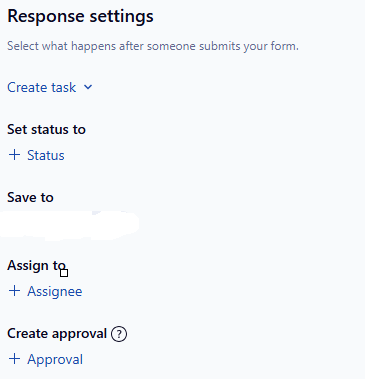
Margot Lyles Unless I am misunderstanding, this sounds like something you could accomplish using blueprints. You would build a blueprint and fill in the needed info, then set your form to "create a task from" and select the blueprints tab to choose your blueprint. (First Pic)
You can even set up a decision tree using multiple blueprints. (Second pic.)
Hi Margot Lyles,
I hope I'm reading and responding to this correctly (bear with me, I'm still without a coffee this morning haha).
You can tie custom fields to any questions within a request form, but not in its "main settings" as you have pictured.
See screenshot below for an example with a single-select question (that we'd want to populate to a single-select custom field)
1. Add your question (the type needs to match the custom field type you want to populate) in the form
2. Click on Use custom field as options
3. Find the custom field you want, click it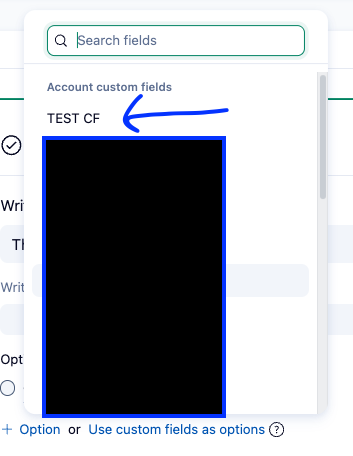
4. The question will auto-populate the custom field options and the custom field will show under "Add answer to"
* You can't edit the option names in request forms; you need to update your custom field and these will update accordingly
* In the form, when in use, the option selected for a custom field question will only add those values to the parent item
* Personally, I always like to include the description as somewhere the info lives - it helps sometimes when investigating issues to see what the original value was (custom field changes are not tracked in an item's activity stream)
If you don't want to add custom fields as questions to a form, some ideas are:
It all depends with what you want and what your process looks like!
I hope this helps and answers your question as I interpreted it! :)