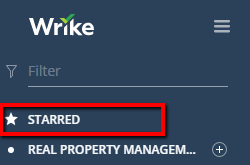
Option to Turn Off "Starred" Folder on menu bar

Permanently deleted user
I find that the "Starred" Folder selection is never showing me what I need to navigate to. Instead of being helpful, I end up closing it to get it out of my way so I can navigate to the folder I want. It would be helpful if we could turn OFF the "Starred" folder section.
I could see it as a useful tool in some applications, but not all. Keeping it as an option that could be toggled off would be helpful.
Hey Kelli, do you normally jump around between a lot of different Folders (too many to have the all starred)?
Yes, I run an enterprise account and have 75 franchisees offices that I manage. I'm in a lot of different folders through the day, so it would be nice to be able to turn off the starred feature. I usually have to collapse it down to get to the folders I need on the regular menu.
I'm getting a much better sense of your teams use case the more we talk. Thanks for all the details, definitely keeping how many offices you have in mind as we chat now!